
Remini vs AIPGEN: Best Photo Enhancement App 2026
If you've tried enhancing old photos lately, you've probably noticed something: Remini just isn't what it used to be.
Users across Reddit are frustrated with subscription price hikes, watermarks on everything, and quality that feels "less accurate and realistic" than before. The good news? There are better options in 2026 — apps that do more than just face enhancement and actually help you restore, edit, and create the photos you want.
Why People Are Leaving Remini
Remini made its name as the go-to app for face enhancement and photo upscaling. For a while, it was genuinely impressive — you could take a blurry old photo and watch it sharpen into something usable.
"Remini App Has Gone Downhill... saving enhanced photos to the history folder is no longer an option. And now the AI's quality feels way less accurate and realistic. Even worse, they slapped watermarks on everything unless you pay, and the free features are practically nonexistent."— Reddit user in r/best_alternative
The pattern is familiar: app gets popular, company raises prices, removes free features, and quality stagnates. Meanwhile, users are left searching for alternatives that actually deliver value.
What Do You Actually Need in a Photo Enhancement App?
Before comparing apps, it helps to understand what modern photo editing should include:
- AI Enhancement — Upscaling and sharpening blurry photos
- Photo Restoration — Fixing scratches, fading, and damage on old photos
- Object/Person Removal — Erasing unwanted elements cleanly
- Creative Tools — Adding elements, filters, text overlays
- Before/After Comparison — Seeing what changed
Here's the thing: Remini really only does the first one well. If you need the rest, you need a different tool.
Remini vs AIPGEN: Feature Comparison
Remini: The Face Enhancement Specialist
Remini's core strength is face enhancement. The AI analyzes blurry faces and adds detail — sharpening eyes, clarifying skin texture, and improving definition. For headshots and portraits, it can work well.
What Remini Does:
- ✅ Face enhancement and upscaling
- ✅ Photo quality improvement
- ✅ AI filters and effects
What Remini Doesn't Do:
- ❌ Object removal
- ❌ Photo restoration (scratches, damage)
- ❌ Group photo creation
- ❌ AI editing templates
- ❌ Background editing
If all you need is to sharpen a portrait, Remini might still work. But for anything else — removing an ex from vacation photos, fixing grandma's damaged wedding picture, cleaning up product shots — you'll need a different app.
AIPGEN: The Complete Photo Editor
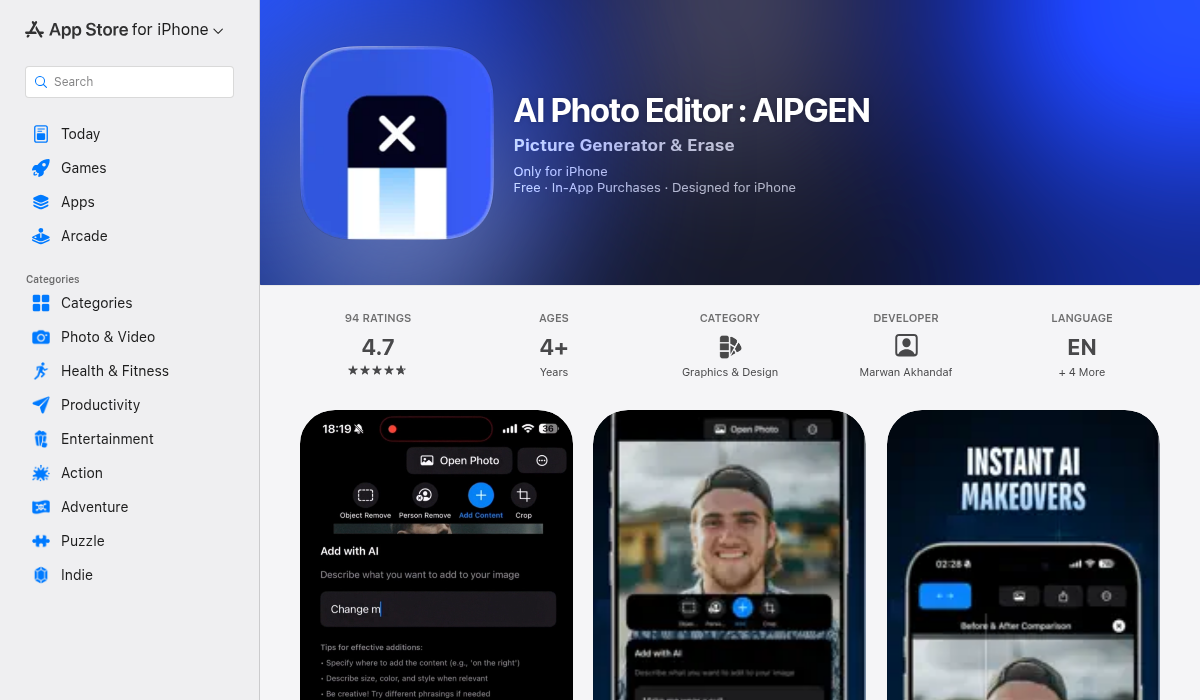
AIPGEN takes a different approach: instead of doing one thing, it gives you an entire AI editing toolkit. The result is an app that handles everything from restoration to creative editing — without needing to switch between multiple apps.
What AIPGEN Does:
- ✅ AI Object/Person Removal — Erase anything from photos cleanly
- ✅ Photo Restoration — Fix scratches, damage, and fading
- ✅ 60+ AI Templates — Quick-apply editing styles
- ✅ Group Photo Creator — Combine individual photos into group shots
- ✅ Before/After Slider — Interactive comparison of edits
- ✅ Photo Filters & Text Overlays
- ✅ In-app Camera Capture
- ✅ Cross-platform (iOS + Android)
The Real-World Test: 4 Common Scenarios
Scenario 1: Restoring an Old Family Photo
You found a 40-year-old photo of your parents, but it's faded, scratched, and slightly blurry.
- Remini: Can sharpen faces, but won't fix scratches or fading
- AIPGEN: AI restoration repairs damage, fixes discoloration, and sharpens details
Winner: AIPGEN — It handles the full restoration job.
Scenario 2: Removing an Ex from Photos
You have great vacation photos, but your ex is in half of them.
- Remini: Can't do this at all
- AIPGEN: Select the person, AI removes them and fills the background seamlessly
Winner: AIPGEN — This is exactly what it's built for.
Scenario 3: Creating a Group Photo from Individual Shots
You have separate photos of family members but want a group shot for a greeting card.
- Remini: Not possible
- AIPGEN: Group Photo Creator combines individual portraits into a realistic group image
Winner: AIPGEN — Unique feature no other app offers.
Scenario 4: Quick Enhancement with Filters
You want to quickly improve a photo's look without manual editing.
- Remini: Basic AI filters
- AIPGEN: 60+ AI templates with various styles and effects
Winner: AIPGEN — More options, faster results.
Pricing Comparison
Both apps use subscription models, but the value equation is different:
- Remini: Weekly/monthly subscription for face enhancement only
- AIPGEN: Subscription includes full editing suite, restoration, removal tools, and 60+ templates
When you're paying for a photo app, getting one tool vs. an entire toolkit makes a real difference.
Pro Tips for Best Results
- Start with the highest resolution original — AI enhancement works better with more source data. Scan old photos at high DPI if possible.
- Use the before/after slider — AIPGEN's interactive slider helps you see exactly what changed and fine-tune edits.
- Combine tools for complex edits — Remove unwanted elements first, then apply restoration, then add filters. Layer your edits.
- Save originals separately — Always keep your original photos. Edit copies so you can start over if needed.
The Bottom Line
Remini still works for basic face enhancement — if you just need to sharpen a blurry portrait, it might be enough. But for anyone who needs real photo editing capabilities in 2026, it falls short.
AIPGEN wins because it treats photo editing as a complete workflow: restoration, removal, creative editing, and enhancement all in one app. The 60+ AI templates alone make it faster than juggling multiple apps. Add in unique features like Group Photo Creator, and it's not really a fair comparison.
If you're ready to move beyond face enhancement and actually edit your photos, AIPGEN is worth trying. There's a free trial edit so you can test the quality before committing.