
Best AI Photo Editors for eBay Sellers 2026
Your eBay listing photos can make or break a sale — and in 2026, AI photo editors have become essential tools for serious sellers.
If you've been flipping items on eBay, you know the struggle. You snap a photo of that vintage jacket or collectible sneaker, and there's your messy kitchen counter in the background. Or worse — your reflection in a mirror, a stray pet walking through the frame, or price tags you forgot to remove. These distractions kill buyer confidence and tank your conversion rates.
The good news? AI-powered photo editing apps have matured significantly, offering one-tap solutions that used to require hours in Photoshop. We tested the most popular options to find out which actually deliver for eBay sellers.
Why Photo Quality Matters More Than Ever on eBay
eBay's search algorithm now factors in image quality when ranking listings. Blurry photos, cluttered backgrounds, and poor lighting can literally bury your items in search results. Meanwhile, professional-looking listings command higher prices and faster sales.
"I switched to clean white backgrounds on all my listings and saw a 40% increase in sell-through rate. Buyers just trust professional-looking photos more."— Reddit user in r/Flipping
But here's the catch — not all AI editing tools are created equal. Some produce obvious artifacts that make buyers suspicious. Others are designed for social media selfies and don't handle product photography well. Let's break down what actually works.
What eBay Sellers Actually Need from Photo Editing
Before diving into specific apps, here's what we prioritized in our testing:
- Background removal/replacement — Clean, professional backgrounds without weird edges
- Object removal — Erasing distractions, stickers, price tags, reflections
- Text removal — Getting rid of watermarks or unwanted text on items
- Batch processing — Handling multiple photos quickly for high-volume sellers
- Mobile-first — Edit on the go, straight from your phone
- Natural results — No AI artifacts that make products look fake
Best AI Photo Editors for eBay Sellers Compared
1. PhotoRoom — The Background Removal Specialist

PhotoRoom has become the default choice for many e-commerce sellers, and for good reason. Its background removal is impressively accurate, especially for products with defined edges like electronics, shoes, and accessories.
The app offers pre-built templates optimized for marketplace listings, including eBay-specific dimensions. You can drop in a product photo and get a clean white background in seconds.
- ✅ Excellent edge detection for clean cutouts
- ✅ Batch processing for high-volume sellers
- ✅ Marketplace-specific templates
- ❌ Limited beyond background work — no object removal within photos
- ❌ Subscription pricing adds up ($12.99/month for Pro)
- ❌ Can struggle with transparent or reflective items
2. TouchRetouch — The Object Eraser

TouchRetouch has been around for years and specializes in removing unwanted objects from photos. If you need to erase a stray cord, remove a price sticker, or clean up blemishes on products, it handles these tasks well.
The interface is straightforward — paint over what you want to remove, and the AI fills in the background. It works particularly well on simple backgrounds but can struggle with complex patterns.
- ✅ One-time purchase ($4.99, no subscription)
- ✅ Good for removing small objects and blemishes
- ✅ Line removal tool great for erasing wires/cords
- ❌ Dated interface feels clunky in 2026
- ❌ No background removal feature
- ❌ Struggles with large objects or complex backgrounds
3. AIPGEN — The All-in-One Solution
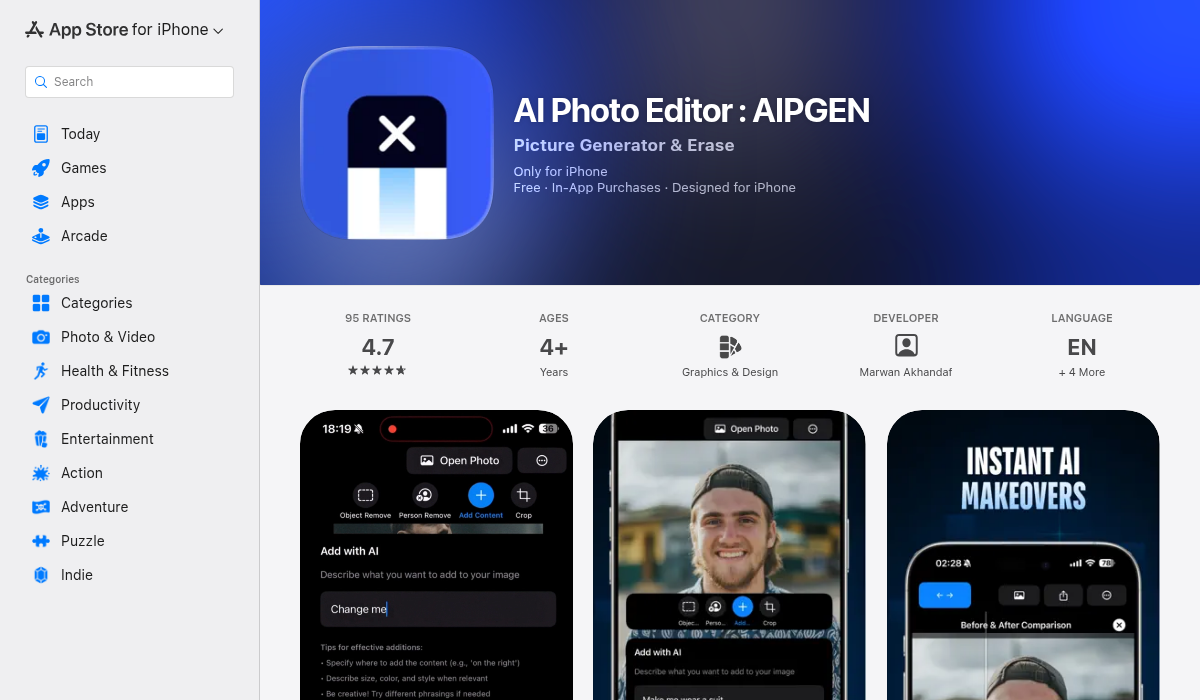
AIPGEN takes a different approach by combining multiple AI editing capabilities in a single app. Instead of bouncing between tools for different tasks, you get object removal, background editing, photo restoration, and 60+ AI templates all in one place.
For eBay sellers specifically, the object removal feature shines. Need to remove your reflection from a mirror shot? Erase a competing brand's logo from a product display? Clean up dust spots on a vintage item? AIPGEN handles these seamlessly without leaving obvious artifacts.
What sets it apart is the photo restoration feature — invaluable for vintage sellers dealing with old product documentation, original photos, or damaged packaging. The before/after slider lets you verify edits look natural before saving.
- ✅ All-in-one: object removal, background editing, restoration
- ✅ 60+ AI templates for quick professional edits
- ✅ Photo restoration for vintage item documentation
- ✅ Before/after slider to verify edits look natural
- ✅ Group photo creator for bundle listings
- ✅ Free trial edit to test before subscribing
- ✅ Cross-platform (iOS and Android)
- ❌ Premium subscription for unlimited edits
4. Remove.bg — Web-Based Background Removal
Remove.bg pioneered AI background removal and remains a solid choice for desktop users. It's web-based, so you upload photos through your browser rather than using a mobile app. The results are consistently good, though the per-image pricing ($9.99/month for 40 images) can get expensive for high-volume sellers.
- ✅ Very accurate background removal
- ✅ Works in browser, no app needed
- ❌ Per-image pricing expensive at scale
- ❌ Background removal only — no object editing
- ❌ No mobile app workflow
Pro Tips for eBay Product Photography with AI Editors
- Start with good lighting — AI can fix a lot, but it can't create detail that isn't there. Photograph near a window or use a ring light. Natural lighting produces more accurate colors and fewer shadows.
- Keep AI edits subtle — Some sellers have reported that overly processed AI backgrounds make buyers suspicious of product authenticity. Use clean backgrounds, but avoid artificial-looking gradients or fake studio setups that don't match your other photos.
- Be consistent across listings — Use the same background style and editing approach for all items. This builds brand recognition and makes your store look professional.
- Edit out distractions, not defects — Remove price tags, reflections, and background clutter freely. But never edit out actual product flaws — that's misrepresentation and will tank your seller rating when buyers receive items.
- Use the before/after preview — Apps like AIPGEN include comparison sliders. Always verify your edits look natural before posting. Obvious AI artifacts (blurred edges, mismatched patterns) hurt buyer confidence.
- Batch process similar items — If you're listing 20 similar items, take all photos in one session with the same setup. Then batch edit with consistent settings for maximum efficiency.
A Word About AI Background Concerns
We've seen discussions in seller communities about AI backgrounds potentially affecting search ranking or buyer trust. Here's what actually matters:
"I use AI backgrounds on my eBay listings, but I keep them simple — just clean white or grey. The fancy AI-generated studio backgrounds made buyers suspicious, thinking my products might be AI-generated too."— Reddit user in r/eBaySellers
The key is using AI as a tool for enhancement, not fabrication. Clean backgrounds, removed distractions, and corrected lighting all improve listings legitimately. Just avoid anything that misrepresents the actual product condition.
The Bottom Line
For eBay sellers in 2026, the choice comes down to your specific needs:
- High-volume sellers focused purely on background removal — PhotoRoom offers the fastest workflow with batch processing
- Budget-conscious sellers needing occasional object removal — TouchRetouch's one-time purchase makes sense
- Sellers wanting maximum flexibility in one app — AIPGEN combines object removal, background editing, restoration, and 60+ templates without switching between tools
We lean toward all-in-one solutions because eBay photography rarely involves just one type of edit. You might need to remove a price tag, then swap the background, then fix some dust spots — and doing that in three different apps burns time.
If you're looking for a single app that handles everything, AIPGEN is worth trying. The free trial edit lets you test whether the results match your needs before committing.