
AI Photo Editing for Real Estate: Best Apps 2026
Real estate photos sell homes — but cluttered rooms, cloudy skies, and that bright pink couch the sellers refuse to move don't exactly scream "dream home."
AI photo editing has transformed how agents and property managers present listings. What used to require expensive photographers and hours of Photoshop work now happens in seconds on your phone. We tested the best AI real estate photo editing apps available in 2026 to see which ones actually deliver professional results.
Why AI Photo Editing Is Now Essential for Real Estate
The numbers don't lie: listings with high-quality photos sell 32% faster and for higher prices. But here's the catch — most agents don't have time or budget for professional photo editing on every listing. This is where AI tools have changed the game.
Modern AI can remove unwanted objects seamlessly, virtually stage empty rooms, replace overcast skies with blue ones, and enhance lighting — all in seconds rather than hours. The technology has matured enough that buyers often can't tell the difference between AI-edited and professionally edited photos.
What Real Estate Photos Need Most
Based on what actually moves properties, here's what AI editing should handle:
- Object removal — Clear out personal items, clutter, and distracting furniture
- Sky replacement — Swap grey, overcast skies for appealing blue ones
- Virtual staging — Add furniture to empty rooms so buyers can visualize the space
- Color correction — Fix yellow lighting and make interiors look bright and inviting
- Interior redesign — Change wall colors, flooring, or outdated fixtures virtually
Best AI Real Estate Photo Editing Apps in 2026
1. BoxBrownie
BoxBrownie has been the industry standard for real estate photo enhancement, offering professional-grade virtual staging and item removal. The catch? It's a service, not an app — you upload photos and wait for turnaround. Quality is excellent but pricing adds up quickly ($1.60+ per image for basic enhancement).
- ✅ Professional-quality results
- ✅ Virtual staging and floor plan creation
- ❌ Not instant — requires turnaround time
- ❌ Per-image pricing gets expensive
2. Styldod
Styldod offers AI-powered virtual staging and sky replacement specifically designed for real estate. Their virtual staging starts at $16 per image and produces realistic results. The platform is web-based with an app option, making it accessible but not truly instant.
- ✅ Realistic virtual staging
- ✅ Decluttering service available
- ❌ Higher pricing tier
- ❌ Turnaround varies by service
3. AIPGEN – AI Photo Editor
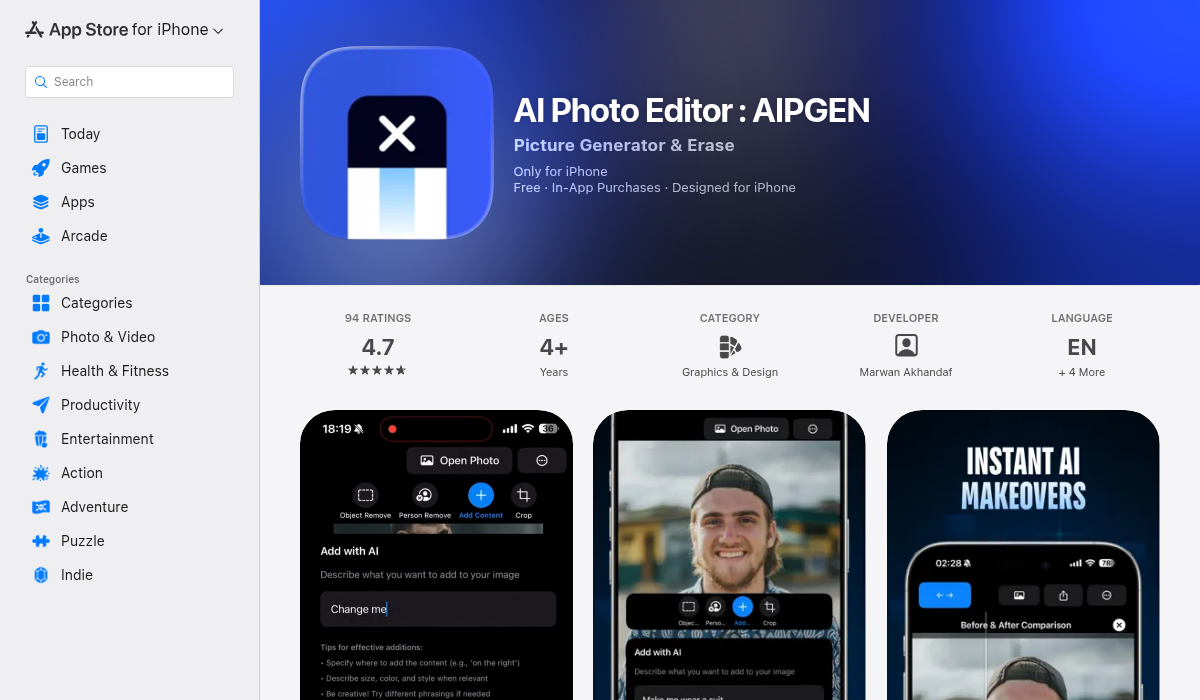
AIPGEN brings professional-grade AI editing directly to your phone with instant results. The object removal feature uses advanced AI to seamlessly erase unwanted items — remove that seller's family photos, the gym equipment in the corner, or the car in the driveway with a few taps.
What makes AIPGEN particularly useful for real estate is the combination of tools in one app. Beyond object removal, you can use AI restoration to enhance older photos, apply filters to brighten dim interiors, and use the before/after slider to show sellers or buyers the transformation. The interactive comparison tool is perfect for client presentations.
The app works on both iOS and Android, meaning your entire team can use consistent editing regardless of their phone.
- ✅ Instant AI object and person removal
- ✅ 60+ editing templates for quick enhancement
- ✅ Before/after slider for presentations
- ✅ Works on iOS and Android
- ✅ Credit-based pricing (more economical for volume)
4. Baytee – AI Room Planner

While not strictly a photo editor, Baytee deserves mention for real estate professionals who need to show potential rather than reality. Upload a room photo and the AI redesigns it entirely — new furniture styles, different wall colors, updated flooring, modern accessories.
This is virtual staging on steroids. Instead of just adding furniture to an empty room, Baytee can transform that dated 1990s kitchen into a modern showpiece. Agents use it to show buyers "what could be" without expensive renovations. The freestyle description feature lets you specify exactly what you want — "mid-century modern living room with warm wood tones" — and the AI generates it.
- ✅ Full room redesign from photos
- ✅ Change flooring, walls, and furniture style
- ✅ Freestyle description for custom designs
- ✅ Before/after comparisons
- ✅ Save and share designs easily
5. PhotoRoom
PhotoRoom excels at background removal and object isolation, making it useful for creating clean property headshots or removing backgrounds for marketing materials. It's less comprehensive for full room editing but excellent for specific tasks.
- ✅ Best-in-class background removal
- ✅ Quick batch processing
- ❌ Limited room editing features
- ❌ Not designed specifically for real estate
Pro Tips for Real Estate Photo Editing
- Remove, don't add too much — Decluttering sells. Heavy virtual staging can look fake and set unrealistic expectations. Focus on removal first.
- Fix the sky in every exterior shot — A blue sky increases perceived property value. It's the easiest edit with the biggest impact.
- Keep virtual staging consistent — If you stage one room, stage them all in a similar style. Mixing aesthetics looks unprofessional.
- Use the before/after slider for sellers — Show them what their listing will look like. It builds trust and manages expectations about the final photos.
- Edit on mobile for speed — Apps like AIPGEN let you edit on-site immediately after shooting. No waiting for desktop processing.
Workflow: From Shoot to Listing
Here's how top agents are using AI editing in their workflow:
- Shoot the property — Use HDR mode on your phone or a dedicated camera
- Quick edit on-site — Remove obvious clutter with AIPGEN before you leave
- Sky replacement — Fix exterior shots if the weather wasn't cooperating
- Virtual staging (if empty) — Use Baytee to show furnished possibilities
- Final touch-ups — Color correction and brightness adjustments
- Export and upload — Direct to MLS from your phone
This entire workflow can happen in under 30 minutes for a standard listing — a fraction of what traditional editing required.
The Ethics Question
A quick note on ethics: AI editing should enhance photos, not deceive buyers. Remove personal clutter? Fine. Erase structural damage? That's misrepresentation. Virtual staging should be disclosed in listings. The goal is helping buyers visualize potential, not hiding problems they'll discover during inspection.
The Bottom Line
For real estate professionals who need fast, on-the-go editing with professional results, AIPGEN delivers the best combination of object removal, enhancement, and accessibility. The credit-based pricing makes it economical for agents handling multiple listings.
For more dramatic virtual transformations — showing dated properties with modern potential — Baytee's AI room redesign capabilities open creative possibilities that standard editing can't match.
The technology has matured. What matters now is using it efficiently. Your competitors already are.